No-code integration platform for rich bi-directional sync

Zero downtime migration to tool of your choice

Keep Historical Data, Without Slowing Down Your Tools

Migrate or restructure Azure DevOps

Real-time, context-rich data lake for AI or analytics
By Role
Accelerate delivery with clear insights

Accelerate delivery with clear insights

Transform smarter with a connected digital thread

Confident transitions for every enterprise change
By Initiative

Modernize and move to cloud without disruption

Build a compliant digital thread for complex environments

Build the foundation for smarter AI
By Domain

No-code integration across teams and systems

Enable collaboration between IT, support, and business teams

Connect PLM & engineering teams for smarter products

Ensure regulatory compliance from start to release

Explore the latest in technology best practices

Success stories from the field

Actionable insights for your business challenges.

See solutions in action

Learn, plan, and execute with confidence

Official announcements and updates

Join discussions that drive results

Stay ahead with curated insights

See side by side comparison
OpsHub and Planview Hub both connect enterprise tools, but they are built for different levels of integration complexity. Planview Hub works well for simpler, Planview-focused synchronization needs, while OpsHub is designed for small & large enterprise environments where reliability, complete data sync, governance, and long-term scalability matter. The biggest difference is how easily teams can manage complex integrations without increasing maintenance and operational overhead.
Terms
01
High‑fidelity federation means preserving the full context of work items, including history, links, files, notes, and mentions.
02
Incremental change detection processes only the work items that actually changed since the last sync.
03
Full‑scan synchronization scans all previously synchronized work items to detect changes that might have been missed.
04
Data fidelity describes how complete, accurate, and trustworthy the synchronized data is across systems.
05
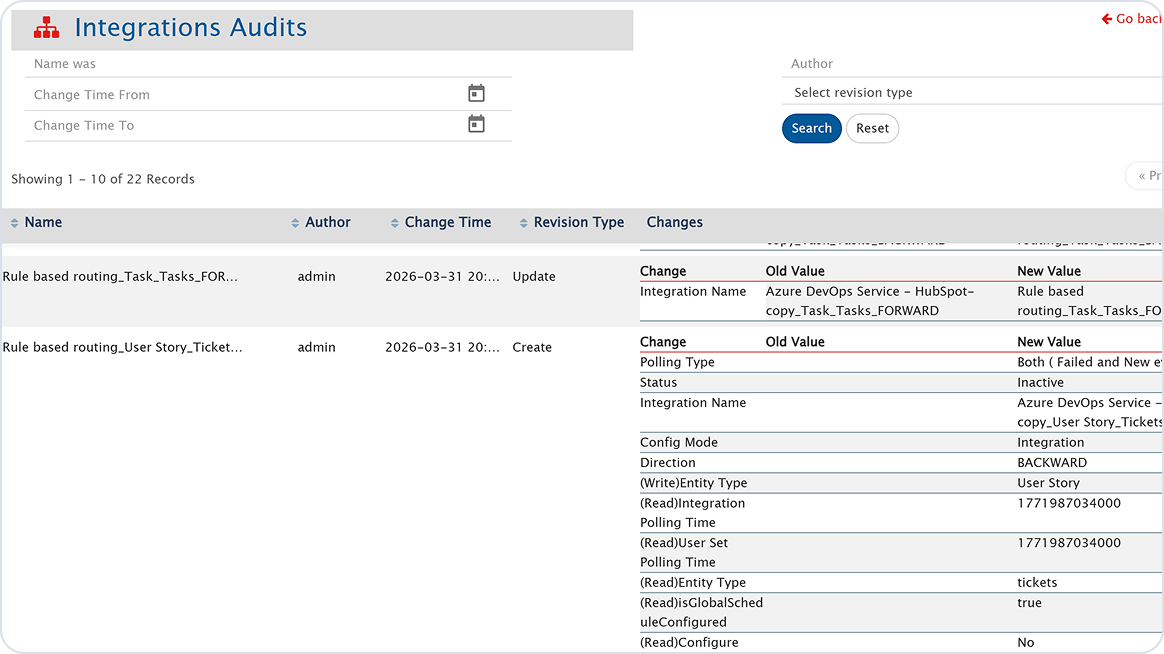
Operational governance refers to the ability to clearly audit how integrations are configured, and changed over time.
06
A vendor‑agnostic integration hub is designed to connect any combination of tools without favoring a single ecosystem.
Change detection
History synchronization
Work item deletion sync
Mentions synchronization
Work item move sync
Work item type change sync
Conflict resolution
Configuration auditing
Deployment options
Free edition
Ecosystem orientation
Best fit
Incremental – no full scans required
Full lifecycle history is maintained
Deletions are reflected across systems
Mentions preserved across tools
Item movement across projects is tracked
Type changes maintained across systems
Advanced field-level strategies
Full audit trail, who changed what and when
On-premise or hosted by OpsHub
Community Edition available
Vendor-agnostic, heterogeneous toolchains
Heterogeneous enterprise toolchains, migrations, compliance
Full scans required to ensure no missed updates
Deletions not consistently propagated
Mentions not carried across systems
Creates duplicate orphan data
Type changes would create duplicate orphan data
Basic dominance models
Limited auditing capability
On-premise or hosted by Planview
Not available
Increasingly Planview-centric post-Tasktop acquisition
Planview ecosystem integrations at
moderate scale
Core difference
Enterprise integrations must preserve the full collaboration context of work items, not just basic fields. How a platform detects changes and what data it carries across systems determines whether teams can actually trust the sync.
As the number of synchronized work items grows, periodic full scans increase the API load placed on every integrated system. This means Jira, Planview, IBM, Azure DevOps, or any connected tool must absorb that overhead, slowing down the tools your teams use every day. OpsHub uses incremental change detection: Only changed work items are processed, so end-system performance stays consistent regardless of work item volume.
The full scan problem
OpsHub is a high-fidelity integration platform, ensuring the full collaboration context of every work item. Only changes are polled in a sync event, keeping end-system performance intact at any scale.
Planview Hub detects changes through periodic polling and rely on full scans to catch missed updates. This scanning behavior increases API load creating performance pressure on all the connected systems.
Planview Hub's full-scan approach creates an API load that compounds as work item counts grow, slowing down every integrated system your teams rely on. OpsHub's incremental detection and high-fidelity data model mean end-system performance stays consistent and collaboration context such as attachments, mentions, history, deletions, moves is never lost in transit.
Sync
Enterprise collaboration produces more than field updates. Mentions, deletions, work item moves, type changes, and lifecycle history all matter when large programs span multiple teams and tools.
OpsHub preserves the full collaboration context of every work item, going far beyond basic field sync to keep team workflows intact across systems.


Planview Hub covers core synchronization for fields, statuses, and comments, adequate for low-risk environments. Several capabilities commonly required for enterprise collaboration are absent.
Control
At enterprise scale, visibility into who configured what and what is syncing at any moment is an operational requirement, not a nice-to-have.
OpsHub gives administrators a centralized view across all running integrations, with monitoring and governance built for large enterprise programs.


Planview Hub offers centralized management of integrations but governance depth is limited particularly around configuration change tracking and multi-project scalability.
Security
Enterprise integrations move sensitive project data across systems. Security posture and data handling practices directly affect risk, compliance, and data residency.
Core platform capabilities are delivered through embedded third-party components creating a security surface that extends beyond Planview’s direct control.
OpsHub’s core sync engine is built entirely in-house, providing complete flexibility to enhance it. Planview Hub embeds third-party software like Eclipse Mylyn and Keycloak to deliver core functionality, which means its security posture depends on the patch cadence and vulnerability response of components outside Planview's direct control.
How you’re charged shapes total cost of ownership, especially as integration scope, project count, and work item volume scale up over time.
OpsHub pricing is based on connectors, and users, aligning cost with actual complexity and value delivered
Planview Hub is an enterprise product with pricing handled through Planview’s enterprise sales process. Costs are not publicly published and vary by organization size, connector count, and scope.
Create reliable, bi-directional integrations across cloud and on-premise systems with OpsHub
Who backs the platform and how fast they respond to customer needs shapes the long-term value of an integration investment. Release velocity and roadmap alignment matter as much as features.
OpsHub is built to work across any toolchain and supports customers regardless of what tools they use. Frequent product releases ensure customer needs are addressed quickly without long wait times.
Planview Hub supports integrations across tools but is increasingly aligned with the Planview ecosystem. Product updates follow a slower release cycle tied to broader platform schedules.
OpsHub supports any toolchain and delivers frequent updates based on customer needs, new releases every 7 to 10 days. Planview Hub is more focused on Planview customers and has slower release cycles, which can delay feature improvements for teams outside the Planview ecosystem.
Support & ecosystem
The underlying architecture of an integration platform determines how it performs under load, how reliably it recovers from failures, and how much control your team has when things need to change.
When core functionality depends on external components, control over performance tuning, failure handling, and long-term compatibility is reduced. Issues in those third-party systems can surface as integration problems that the platform vendor cannot fully resolve. OpsHub is built fully in-house. Every key component is owned, maintained, and optimized by the same team that builds the integration logic.
Third-party dependency risk
OpsHub is purpose-built as a dedicated integration platform to handle large-scale, real-time data movement. It processes only actual changes and never repeatedly scans entire systems, keeping performance stable as data grows.
Planview Hub uses a polling-based approach that checks systems regularly for updates. This can involve scanning previously synced data, increasing load as data volumes grow.
OpsHub processes only real changes and is built entirely in-house giving the team full control over performance, reliability, and failure recovery at scale. Planview Hub relies on repeated scans and external components, which can increase system load on connected tools and reduce control over integration behavior as programs grow.
Common objections
If Planview products dominate your toolchain, Hub's ecosystem alignment is genuine. But if you also run IBM, PTC, Aras, Jira, ServiceNow, Azure DevOps, any other non-Planview tools, OpsHub's broader connector library and deeper sync fidelity prevent integration gaps from becoming technical debt.
At low work item counts, periodic full scans are low-impact. Enterprise toolchains grow. Platforms that scan all previously synced work items as volume climbs create increasing API load on integrated systems eventually degrading performance for end users.
Most teams don't, until they plan a migration, face a compliance audit, or onboard a new tool. Platforms without history sync require supplemental tooling for these scenarios. Starting with OpsHub avoids that rework entirely.
Rarely true at enterprise scale. Custom connectors require 3–6 months to build, then 20–30% of that annually in maintenance, tracking API changes, security updates, and edge cases. OpsHub's 70+ connectors absorb that cost.
Those cover the basics, but three gaps break real workflows: work items moved across projects disappear from the sync entirely, creating ghost records on the connected side. @-mentions in comments are dropped, the text arrives but the notification never fires. Inline images embedded in rich text descriptions don't sync, leaving broken content on the receiving end. The connected system gets the files but not the collaboration.
Tasktop's acquisition shifted the product roadmap toward Planview's own portfolio. Teams outside the Planview ecosystem are investing in a platform whose direction increasingly diverges from their use cases. OpsHub remains vendor-agnostic by design.
Common objections
Yes. Planview Hub is the successor to Tasktop Integration Hub following Planview’s acquisition of Tasktop. The platform’s roadmap has since
shifted toward the Planview portfolio including VSM and PPM products making it increasingly focused on Planview-centric environments rather
than broad heterogeneous toolchain support.
Planview Hub is primarily a synchronization platform. Full historical migrations moving complete artifact history, relationships, and lifecycle states
are not a core design objective, and history synchronization is explicitly not supported. Organizations planning large migrations typically need
OpsHub or a dedicated migration tool alongside Planview Hub
Platforms that periodically scan all previously synchronized artifacts to detect missed updates generate increasing API load as artifact counts grow. At low volumes this is manageable. At enterprise scale thousands of projects, millions of artifacts full scans can degrade performance on integrated systems, slow sync response times, and approach API rate limits on tools like Jira and Azure DevOps. OpsHub’s incremental change detection avoids this pattern entirely.
OpsHub Integration Manager supports 70+ tools across ALM, DevOps, ITSM, and CRM including Jira, Azure DevOps (Cloud and Server), ServiceNow, Micro Focus ALM, Rally, Digital.ai Agility, Jama, Salesforce, GitHub, GitLab, Jenkins, IBM DOORS, Enterprise Architect, and many more. Custom connectors can also be developed and plugged into OIM for home-grown or niche systems.
Yes. OpsHub Integration Manager has a Community Edition that is free to download with lifetime support through OpsHub Community. It covers bidirectional integration for ServiceNow, Jira, Jira Align, Azure DevOps, Micro Focus ALM, Digital.ai Agility, Jama, and Rally — with all key features of the paid edition included.
Yes. OpsHub Integration Manager is a standalone application deployable on most Windows or Linux VMs. It supports SQL Server, Oracle, PostgreSQL, and MySQL. OpsHub can also host OIM if an on-premise deployment isn’t preferred. Planview Hub also supports both on-premise and cloud deployment.
Making your decision