OpsHub Integration Manager

No-code integration platform for rich bi-directional sync

OpsHub Migration Manager

Zero downtime migration to tool of your choice

OpsHub Archive Manager

Keep Historical Data, Without Slowing Down Your Tools

OpsHub Migrator for Microsoft Azure DevOps

Migrate or restructure Azure DevOps

OpsHub Data Bridge

Real-time, context-rich data lake for AI or analytics

Discover our story, vision, and impact.

By Domain

Software Development & Agile Engineering

No-code integration across teams and systems

IT Service Management & Customer Support

Enable collaboration between IT, support, and business teams

Product Lifecycle Management & Systems Engineering

Connect PLM & engineering teams for smarter products

Requirements Management for Regulated Industries

Ensure regulatory compliance from start to release

Blogs

Explore the latest in technology best practices

Case Studies

Success stories from the field

White Papers

Actionable insights for your business challenges.

Videos

See solutions in action

EBooks

Learn, plan, and execute with confidence

Press Releases

Official announcements and updates

Webinars

Join discussions that drive results

News Letters

Stay ahead with curated insights

Compare-2

Compare

See side by side comparison

Migrate to Jira without downtime or disruption

Seamlessly migrate your projects, teams, and history to Jira with zero data loss while preserving complete traceability.

What are some common migration challenges while migrating to Jira?

Downtime halts work

Teams are locked out during migration

Data loss & broken traceability

Missing work items, attachments, or links create audit and compliance issues

One-project-at-a-time

Slow, sequential migrations drag the process for longer durations.

The OpsHub advantage for migration to Jira

Smarter planning with Data Discovery Utility

Analyse project scope, data size, and dependencies upfront for a risk-free roadmap to migrate to Jira with OpsHub Data Discovery Utility.

Move multiple projects simultaneously

Run multiple project migrations in parallel, accelerating timelines and reducing business impact.

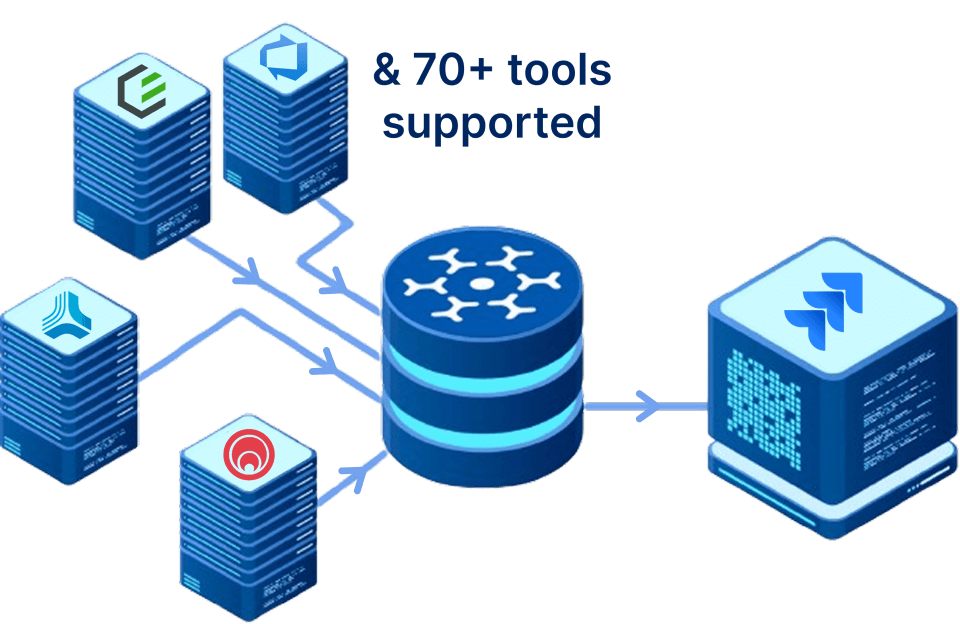
Supports migration from 70+ tools to Jira

Seamlessly migrate from Azure DevOps, Rally, Micro Focus ALM, ServiceNow, GitHub Issues, VersionOne, Bugzilla to Jira.

Zero downtime migration

Keep teams productive while migrating projects, issues, and workflows. No system freezes or interruptions.

Zero disruption migration

Run your legacy system and Jira in parallel, validating every item before the final cutover.

Expert support

OpsHub’ s dedicated migration team provide guidance at every step, ensuring stress-free execution.

Experience scalable, non-disruptive migration with OMM

Schedule a free 30-minute live demo with our migration engineers

What Can Be Migrated

Supported Tools:

OpsHub Migration Manager supports migration to Jira from 70+ systems more across DevOps, ITSM, and ALM ecosystems. Learn more

Supported Entities:

Trusted by forward-thinking teams across the globe

Proven Across Enterprises

Trusted by leaders in technology, aerospace, defence, and healthcare

Ready to move to Jira?

Your journey towards a zero downtime Jira migration begins here.

Tools and entities we support

Migrate to Jira from these, and 60+ tools

Tool Versions Entities

Jira

Cloud On Premise: (Server and Data Center):4.x (except 4.4), From 5.x.x to 8.22.x On Premise: (Data Center): 9.0.0 to 9.12.x
All System & Custom Issue Types, Sub-Task Types, Version and Worklog; Sub-Task Write, and Version is not supported below Jira Version 5.0.

Rally

RALLY Version: All API Version: v2.0
Portfolio Items, Defect, Task, Test Case, Test Case Result,Test Set, Test Folder, User Story, Change Set [Write support only, Release, Iteration, Milestone], Risk

IBM Rational DOORS

9.1, 9.2, 9.3, 9.4, 9.5, 9.6 till 9.7.2
Requirement, Baseline [Read only]

Azure DevOps(VSTS)

All
Test Plan, Test Result, Test Run, Test Suite, all Workitems such as Bug, Requirement, Task, Test Case, User Story, Shared Steps, Iteration, Area Path, Group, Team, User, Dashboard, Query, Widget and Pipeline
Only Read Support for: Git Commit Information , Pull Request, *Build [Build Entity – limited release. May change in future and requires OpsHub Professional Services engagement]

Azure DevOps Server(TFS)

2010, 2012, 2013, 2015 (up to Update 3), 2017, 2017 Update 2, 2018, 2019, 2020, 2022
Test Plan, Test Result, Test Run, Test Suite, all Workitems such as Bug, Requirement, Task, Test Case, User Story, Shared Steps and All Custom Entity Types
Iteration, Area Path, User Group, Team and User [For Versions > 2010] Dashboard, Query, Widget [For Versions >= 2017] Only Polling Support for : Git Commit Information [For Versions >= 2016], Pull Request [For Versions >= 2018], Build [For Versions >= 2019] [Limited release – May change in future and requires OpsHub Professional Services engagement], Pipeline [For Versions >= 2018]

OpenText ALM(Micro Focus ALM/QC)

SaaS: 15.x, On-Premise: 10.0*, 11.0*[Patch 8, i.e., Micro Focus ALM/QC 11.00 Service Pack 3 and later], 11.5, 11.5x, 12.0, 12.2, 12.5, 12.52, 12.53, 12.55, 12.6, 15.x, 16.x, 17.x
Defect, Requirement, Test, Test Set, Test Set Folder (supported for Saas and On-Premise: Version 12 and above), Test Configurations (supported for On-Premise: Version 15 and above), Test Plan Folder (supported for Saas and On-Premise: Version 12 and above), Test Run, Cycle (supported in Micro Focus ALM/QC 11 and above), Release (supported in Micro Focus ALM/QC 11 and above), Release folder (supported in Micro Focus ALM/QC 12 and above)Trigger Support: Test Set, Execution Request
How can I ensure data integrity during Jira migration?

Data integrity during Jira migration depends on completeness, accurate mapping, and validation before cutover.

  • Migrate complete data: Preserve full revision history, comments with original author and timestamp, attachments, inline images, issue relationships, and custom field values—not just the current record state.
  • Map data accurately: Map source entities, fields, workflow states, picklist values, and user identities to their correct Jira equivalents. OpsHub Migration Manager provides a visual mapping interface to identify unmapped fields and values.
  • Validate the migration: Run a pilot migration and compare records field by field against the source. OpsHub provides validation reports covering record counts, field-level mappings, and conflicts.
  • Maintain an audit trail: An exportable audit log confirms what was migrated, when, and with what values.

This helps prevent silent data loss and provides a complete, auditable migration record.

How do I migrate from Rally to Jira?

Migrating from Rally to Jira requires mapping Rally’s data model to Jira’s issue types and project structure.

Common mappings include:

  • User Stories → Stories
  • Defects → Bugs
  • Features → Epics
  • Iterations → Sprints
  • Rally hierarchy → Jira issue links

OpsHub Migration Manager provides a pre-built Rally connector supporting:

  • Full history and audit sync
  • Comments with original author and timestamp
  • Inline images and attachments
  • Relationship links
  • Criteria-based migration by project, type, status, or custom fields

After the historical migration, bi-directional sync allows teams to continue working in Rally while transitioning to Jira. This phased approach helps avoid data gaps and the risks associated with a hard cutover.

What tools can I use to migrate data to Jira from other ALM and DevOps platforms?

The right Jira migration approach depends on the data being migrated, data volume, and whether teams need to continue working during migration.

  • CSV import: Suitable for low-volume migrations where only current field values need to move.
  • Purpose-built migration platform: Better suited when revision history, attachments, relationships, or ongoing source-system work need to be preserved.

OpsHub Migration Manager (OMM) supports 70+ source systems with pre-built connectors, including:

  • Microsoft Azure DevOps
  • Rally
  • IBM DOORS
  • ServiceNow
  • HP ALM
  • PTC Codebeamer
  • Polarion

OMM migrates revision history, comments with original author and timestamp, attachments, inline images, and relationships. Background migration and delta sync allow teams to continue working in the source system until cutover.

How do I migrate from Azure DevOps to Jira without losing work item history?

To preserve Azure DevOps work item history when migrating to Jira, every revision must be migrated with its corresponding field values, author, and timestamp.

OpsHub Migration Manager can migrate:

  • Work items → Jira issue types
  • Full revision history
  • Comments → Original author and timestamp
  • Attachments and inline images
  • Work item links → Jira issue links
  • Iterations → Sprints
  • Area paths → Components or labels
  • Custom fields → Type-matched Jira fields

The migration can run while teams continue working in Azure DevOps. Delta sync captures changes made during the migration window, keeping Jira current for the final cutover and helping teams switch without a gap in their data.

Can I migrate to Jira Cloud from tools like HP ALM, IBM RTC, or Polarion?

Yes. OpsHub Migration Manager supports migration from HP ALM (Quality Center), IBM Rational Team Concert (RTC), Polarion, and 70+ other ALM, DevOps, and ITSM tools into Jira Cloud, Jira Data Center, and Jira Server.

These migrations can involve different data models:

  • HP ALM: Requirements and test management
  • IBM RTC: Work items, state models, and change-set history
  • Polarion: Documents, work items, and traceability links

OpsHub uses pre-built connectors to translate these data models into Jira’s issue types, fields, and link structures.

For regulated environments, OpsHub can migrate revision history, test cases, test results, requirements traceability, and audit trails. The platform can also be deployed on-premise to keep migration data within the organization’s network.

This gives teams a Jira environment with the historical context needed for audits, sprint planning, and ongoing development.