















Integrate Jira with Azure DevOps
Bi-directional sync using OpsHub Integration Manager
Jira and Azure DevOps (VSTS) integration ensures there is no scope for communication gaps or miscommunication between project management and development teams.OpsHub Integration Manager enables you to integrate Jira with AzureDevOps with real-time updates and no disruptions.
Schedule a free 30-minute live demo with our integration experts

Connect Jira-Azure DevOps: How it works
In an Application Lifecycle Management (ALM) ecosystem, the choice of systems and the collaboration between the cross-functional teams play a great role. While the choice of systems impacts the productivity of a team, cross-functional collaboration helps the teams get complete context of the business requirements.
Best-of-breed systems such as Jira and Azure DevOps (VSTS) bring rich functionalities to the ecosystem. By integrating Azure DevOps (VSTS) with Jira, enterprises can seamlessly manage product development. The developers using Jira will have clear visibility into the exact feature requirements and real-time access to any changes/enhancements made to the requirements. On the other hand, Azure DevOps (VSTS) users will have a complete view of the development of a requirement that is progressing.
How Azure DevOps (VSTS) and Jira integration is beneficial for an enterprise
- Access to all test cases, defects, and QA plan
- Trace the requirement breakdown completely – access the features, stories, tasks associated with the requirement
- Developers are always up-to-date on feature requirements and associated updates
- Track the estimated and actual development efforts
- Get complete context of the business requirement and receive real-time updates when there is a change in the plan
- Coordinate on the delivery timelines seamlessly with concurrent updates on changes
With Azure DevOps (VSTS) and Jira integration, enterprises can:

- Make better and faster decisions
- Enhance collaboration between business and backend teams
- Ensure complete traceability of all stories
- Ensure quality delivery in stipulated time
- Leverage the best of functionality and collaboration in the delivery ecosystem
Sync Jira with Azure DevOps (VSTS) using OpsHub Integration Manager
OpsHub Integration Manager integrates Azure DevOps (VSTS) and Jira bidirectionally. It ensures that all historical and current data is available to each user, in that user’s preferred system, with full context, in real-time. All ‘requirements’ from Azure DevOps (VSTS) automatically synchronize to Jira where they are broken down to ‘stories’. The completion of the story and the status of test results against it automatically synchronizes to Azure DevOps (VSTS).
Steps to Integrate Jira and Azure DevOps (VSTS)
- Step 1: Configure Jira and Azure DevOps (VSTS) systems.
- Step 2: Configure the mapping.
- Step 2.1: Select the project and the Entities for mapping.
- Step 2.2: Map the fields of the selected entities.
- Step 3: Configure the integration.
- Step 4: Activate the integration.
Popularly synchronized entities
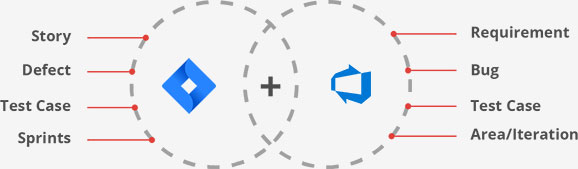
Connecting Jira and Azure DevOps: Use Case
Problem statement: The development team uses Jira, and the project management team uses Azure DevOps. Both teams collaborate manually to exchange data and insights. This leads to miscommunication multiple times.
Solution: When Jira and Azure DevOps are bi-directionally integrated using OpsHub Integration Manager, there is no scope for communication gaps or miscommunication between project management and development teams.
- The project manager logs a ‘feature’ in Azure DevOps. The feature synchronize to Jira.
- The development team breaks the feature down into ‘user stories’ in Jira.
- The development team completes the work on the ‘user stories’ and mark the ‘feature’ as complete. Subsequently, the status of ‘feature’ also synchronizes to Jira.
- In case the QA team reports a ‘defect’, the development team logs the ‘defect’ in Jira, the ‘defect’ also synchronizes to Azure DevOps. The project manager, is therefore, always up to date with progress of a requirement.

Team Benefits of Integrating Jira and Azure DevOps (VSTS)
Azure DevOps (VSTS) users
- Traceability for business requirements throughout
the ALM tool chain - Access to complete development plan
- Visibility into the progress of development work
- No dependency on manual communication for
making business decisions
Jira users
- Real-time updates on feature requirements and associated changes/enhancements
- Clear visibility into quality parameters and test results from Jira itself
- No manual efforts needed to keep product management teams updated on the development status
Frequently Asked Questions
Yes, Jira can integrate with Azure DevOps through plugins or third-party tools. The integration allows for traceability between requirements in Azure DevOps and issues in Jira, enabling better collaboration between development teams and stakeholders.
One popular approach is to use OpsHub Integration Manager (OIM). This is a commercial tool that can synchronize data between Azure DevOps and Jira. OIM provides bi-directional synchronization of data between Azure DevOps and Jira, allowing you to manage requirements in Azure DevOps and defects in Jira, and keep them in sync with each other. The tool can also handle complex data mappings between the two systems, ensuring that data is transferred accurately and consistently.
Jira is used in Azure DevOps by integrating it with the Azure DevOps suite of tools to provide additional issue tracking and project management capabilities.
The integration provides several benefits, such as:
- Ability to track work items across multiple systems: By linking Jira issues to Azure DevOps work items, users can track work across both systems.
- Improved collaboration: Teams using different systems can collaborate more effectively by being able to see each other’s work.
- Increased visibility: Users can get a better understanding of the entire software development process by seeing work items from both systems in one place.
- Streamlined workflows: The integration allows for the automation of workflows, such as automatically creating work items in Azure DevOps when a Jira issue is created.
To integrate Jira and Azure DevOps using OpsHub Integration Manager, you can follow these steps:
- In OIM, select Jira and Azure DevOps as the applications to be integrated.
- Map the fields between Jira and Azure DevOps. This step involves mapping the fields that will be synced between the two applications.
- Specify the type of integration you want to set up. For example, you may want to create a one-way integration that sends data from Jira to Azure DevOps, or a two-way integration that syncs data between the two applications.
- Set up the integration schedule. You can configure OpsHub Integration Manager to automatically sync data between Jira and Azure DevOps at specific intervals. For example, you can sync data every hour, or even every minute.
- Configure the data mappings, such as which fields should be synchronized between the two systems.
- Set up the synchronization frequency and direction, such as whether data should be synchronized in real-time or on a schedule.
- Test the integration. Before deploying the integration, you should test it to ensure that it is working correctly.
- Deploy the integration. Once you have tested the integration and are satisfied that it is working correctly, you can deploy it to your production environment.
Get started with your Jira and Azure DevOps (VSTS) Integration today