OpsHub Integration Manager

No-code integration platform for rich bi-directional sync

OpsHub Migration Manager

Zero downtime migration to tool of your choice

OpsHub Archive Manager

Keep Historical Data, Without Slowing Down Your Tools

OpsHub Migrator for Microsoft Azure DevOps

Migrate or restructure Azure DevOps

OpsHub Data Bridge

Real-time, context-rich data lake for AI or analytics

Discover our story, vision, and impact.

By Domain

Software Development & Agile Engineering

No-code integration across teams and systems

IT Service Management & Customer Support

Enable collaboration between IT, support, and business teams

Product Lifecycle Management & Systems Engineering

Connect PLM & engineering teams for smarter products

Requirements Management for Regulated Industries

Ensure regulatory compliance from start to release

Blogs

Explore the latest in technology best practices

Case Studies

Success stories from the field

White Papers

Actionable insights for your business challenges.

Videos

See solutions in action

EBooks

Learn, plan, and execute with confidence

Press Releases

Official announcements and updates

Webinars

Join discussions that drive results

News Letters

Stay ahead with curated insights

Compare-2

Evaluation Toolkit

Evaluate before you buy

How to scope a migration before it starts?

A migration plan needs four numbers: how much data you are moving, how much history sits behind it, where it is concentrated, and how the source is structured. All four already exist inside your source system. None of them are visible from the project list. Data discovery is the stage that produces them, and it is where a migration plan has to start. Read on for what to find out before you plan, what a scan reports, and how to turn the output into a plan you can commit to.

Devang Rathod

share this post:

Every migration plan answers the same questions. What are we moving. How long will it take. In what order. Who is needed, and for how long. How will we know it worked.

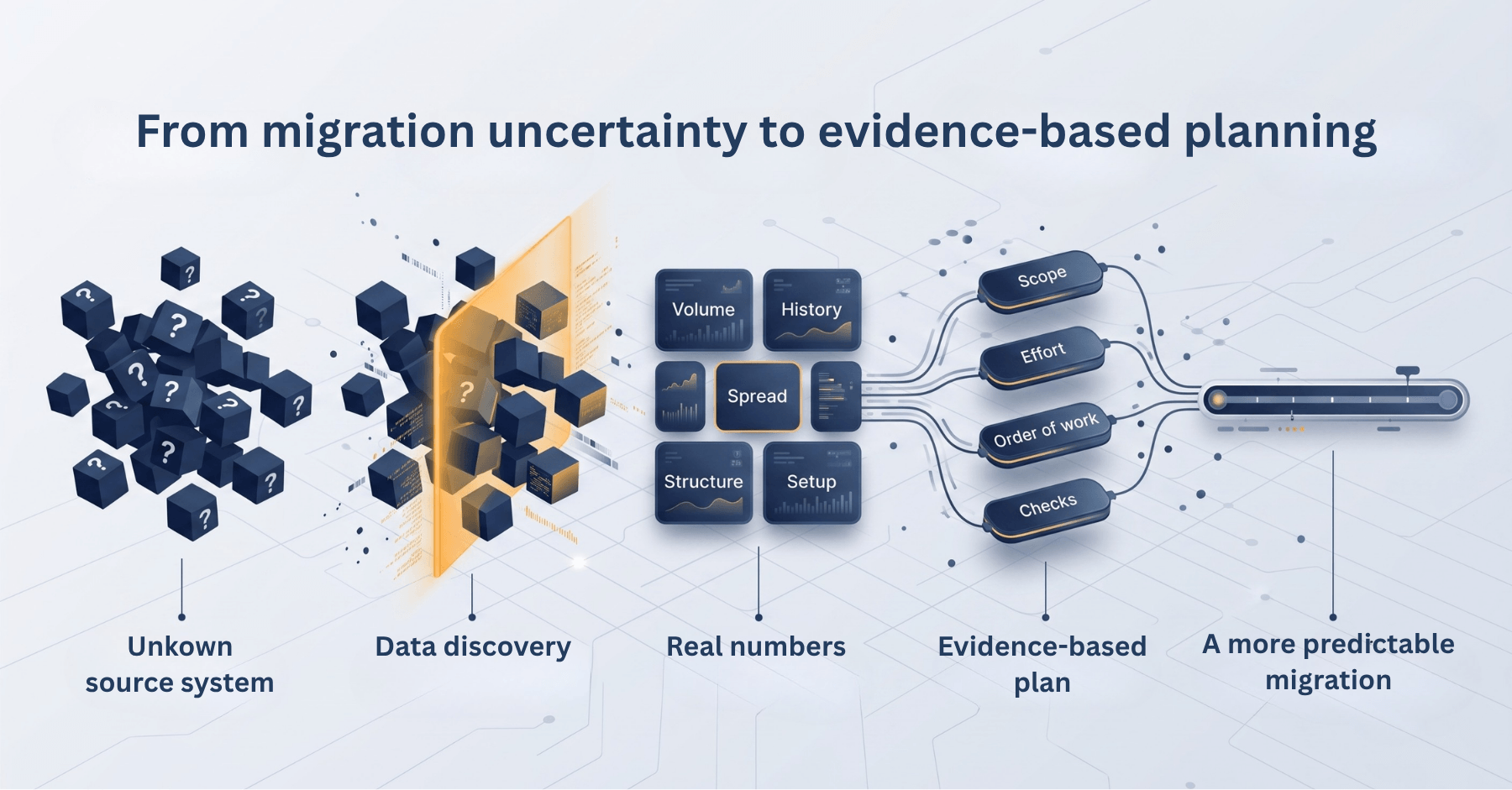
Those answers all depend on figures from the source system. And the figures are not on the screen anyone is looking at. The project list gives you names. What a plan needs is what sits underneath the names: the volume in each project, the revision history behind that volume, how unevenly it is distributed, and how the structure is arranged.

That information exists. It is simply spread across dozens of projects and screens, which is why it usually gets estimated in a meeting rather than counted. A data discovery scan counts it instead, in one pass, without touching anything in the source.

This is the first stage of migration, and the plan is its output. Everything downstream is built from what this stage produces: scope, effort, sequencing, sign-off, and the checks you run at the end.

What is data discovery before migration?

Data discovery before migration means scanning the source system to establish what data is in it, how much history it carries, how it is distributed, and how it is structured, and then using those figures to build the migration plan. What a scan can report depends on the source platform.

What does a migration plan need before you can commit to it?

Five inputs. Each one decides a different part of the plan, and none of them can be inferred from the project list.

  • Inventory: Decides what you are committing to. What entities and records exist, and how many of each. This is the figure your effort estimate is built on.
  • Scope: Decides the boundary. Which projects, workspaces, or repositories are moving, and which are deliberately staying behind. An explicit exclusion is a decision; an unexamined one is a gap.
  • History: Decides your timeline. How many past versions sit behind those entities. A migration moves history alongside current state, so this figure often matters more to the schedule than the item count does.
  • Distribution: Decides your sequence. Where the volume is concentrated. Estates are rarely evenly loaded, and one project frequently holds a disproportionate share, which changes what moves first and what moves alone.
  • Structure: Decides your scope arithmetic. How projects and hierarchies are arranged, and whether a reported count covers a full hierarchy or only its top level. The difference between those two readings can be substantial.

With these five, the plan is arithmetic. Without them, scope is whatever was assumed, effort is whatever was estimated, and the running order is whatever seemed convenient. The plan still gets written either way; the difference is whether it survives contact with the migration.

Here is the same plan, written both ways.

Plan Element Estimated Measured
Data volume Assumed from item counts Counted, by project and type
Scope Inherited from a project list Defined, with exclusions recorded
History Rarely considered Quantified against current state
Sequence Whatever is convenient Set by where the volume sits
Timeline A rate someone suggested Derived from measured volume
Validation Spot checks Compared against the opening figures
From migration uncertainty to evidence-based planning

What does a data discovery utility show you?

A data discovery utility connects to your source system and reports what is in it. It is read-only. It does not move, change, or delete anything, which means you can run it at any point, while the business case is still being argued and long before a migration is approved. Running it commits you to nothing.

The output falls into six categories:

  • Data volume: How many entities or records exist, broken down by project or by type.
  • Historical depth: How many revisions sit behind those entities, where the platform supports revision analysis.
  • Scope and distribution: How the data is spread across projects, workspaces, or repositories.
  • Relationships and structure. How entities are organised within the source, including whether reported totals cover a full project hierarchy or only its top parent level.
  • Configuration. Templates, fields, and similar settings, where the source platform supports configuration discovery.
  • Version control. Repository, changeset, and related information, where the source platform supports it.

Two of these decide more of the plan than the rest, and both are routinely missed.

History is the one that moves timelines. A project with 4,000 items and ten years of activity is not a 4,000-item migration. Every edit made across those ten years is a separate version, and history moves alongside current state. It is common for the revision count to be a multiple of the item count, and it is the item count that people plan around.

Hierarchy reporting is the one that moves scope. Whether a count covers parent projects only or everything beneath them can change a total substantially, and it is exactly the kind of detail that stays unexamined until the migration is already running.

What a scan can report depends on the source platform and the scenario. A category available for one ecosystem does not automatically exist for another, so confirm what your source supports before assuming a scan will answer a particular question.

How do you run a discovery scan?

Four steps, whichever platform you are scanning.

What this looks like in practice?

An illustration rather than a single customer story, though the shape of it is familiar.

A team is moving five projects. The projects look comparable from the project list, so the plan is a single weekend for all five.

They scan before signing off. Three findings come back. One project holds more data than the other four combined. The revision total across all five is several times what the item counts implied, which resets the effort estimate. Two projects use a setup the target does not match, so mapping work is needed that the other three do not require.

The plan changes shape. The large project moves alone. The mapping work is scheduled ahead of the migration rather than discovered during it. The single weekend becomes three phases, each with a figure behind it. And the scan output becomes the checklist the target is validated against afterwards.

Nothing was migrated. The plan simply stopped being a guess, and it changed at the only point where changing it was still free.

Where discovery sits, and what comes next?

A migration runs in five stages. Discovery is the first, and the plan is what it hands to the rest.

  • Discover. What is there? Measure volume, history, distribution, structure, and setup, as far as the platform reports them.
  • Assess. What does it mean? Read the figures against your goals. A heavy revision history means one thing if you need all of it and something else if you do not.
  • Plan. What moves, how, and in what order? Turn the assessment into scope, effort, sequence, schedule, and checks.
  • Migrate. Execute the plan.
  • Validate. Does the target match? Compare it against the figures captured in stage one.

The first stage and the last are the same measurement, taken twice. That is the argument for keeping the output rather than discarding it once the plan is written.

The strongest migration plans are not built on what a team believes is in the source system. They are built on what the team can show is in it.

Skipping discovery does not remove the work. It relocates it to the point where changing direction is most expensive. So run the scan yourself. It is read-only, it costs nothing, and it is useful whatever you decide next. Then bring us the output. Our experts will work through it with you and turn it into a Migration Strategy Blueprint covering your recommended approach, scope, key risks, dependencies, and execution roadmap without any obligation.

FAQs

Does running a scan change anything in the source system?

No. A scan is read-only. It does not move, change, or delete anything, and it does not require an installation on the source system.

When should we run discovery?
Before the plan is written, and before the migration is approved. The output is what the business case and the timeline are built from, so running it late means the numbers arrive after the commitments have already been made.
What do we do with the scan output after the plan is written?
Keep it. The figures captured before the migration are what you compare the target against once the migration is done. Discarding the output means validation falls back to spot checks.
What does a discovery scan report for Jira?
Item counts for each project you select, which of those items fall inside the scope you are testing, and the number of versions behind each item. Supported for Jira Data Center and Jira Cloud.
What does a discovery scan report for Microsoft Azure DevOps?

Work item and revision counts by work item type, test entities, TFVC and Git version control detail, user counts in the source and the target and where they differ, and setup detail including a process template comparison, where supported. Azure DevOps Server, Azure DevOps Services, and TFS are covered by the Azure DevOps data discovery utility.

What does a discovery scan report for Rally?
Counts of requirements, defects, test cases, and milestones, how they are spread across workspaces and projects, and whether the totals cover parent projects only or everything beneath them. That last figure is the one that most often changes scope.
What does a discovery scan report for OpenText ALM (Quality Center)?
Counts of requirements, defects, tests, and test sets, which parts of the source hold the most data, and the version depth sitting behind it.
What does a discovery scan report for Helix ALM?

Counts of issues, requirements, tests, test runs, and documents, and how those are distributed across projects.

My source system is not listed here. Can you still scan it?

A scan has to be built for the system it reads, because every system stores its data differently. The utilities above are the self-serve ones. Migration coverage is much broader, so tell us your source and target and we will confirm how discovery works for your scenario.

Talk our migration experts today to discuss your unique requirements

Plan your migration with evidence, not assumptions

Customer Logos