As a part of DevOps Transformation, there’s an increased focus on forming cohesive teams for bridging the gap between development and operations. If you work with DevOps teams, you realize the importance of streamlining development, building, testing, release and deployment processes – for improving collaboration, automation and value creation throughout the software delivery pipeline.
The core aim of DevOps is to break down the siloes between development and operations, reduce the burden on software developers, and channelize team efforts towards innovation and feature development. However, progressing on the DevOps terrain can be an uphill climb without the right tools for managing and analyzing your business data.
For innovation-focused businesses, who are looking to find the right platform for streamlining DevOps processes and gain better end-to-end visibility, Jira and GitHub are two widely used tools. Jira-GitHub integration equips software teams with enhanced traceability, improved software quality and faster, error-free releases.
In this blog, we’ll guide you on how you can make the most of a Jira and GitHub integration. You’ll also learn about the benefits of integrating Jira with GitHub along with a step-by-step integration guide – using OpsHub Integration Manager.
Jira and GitHub: Explained
What is Jira?
Jira is a project management software created by Atlassian in 2002, with a core focus on supporting agile software development practices.Its numerous versions and customizable features allow for added flexibility and ease of use for software development teams.
In addition to being a comprehensive project management tool, Jira is particularly useful for DevOps teams. It enhances cross-functional collaboration and communication between team members, making it easy to track changes and updates for projects in real-time.Moreover,Jira’s customizable dashboards and reports allow teams to monitor project progress, identify or DevOps transformation bottlenecks, and optimize end-to-end workflows.
The Atlassian suite comprises several products including Jira Core, Jira, and Jira Service Management (Formerly Jira Service Desk). Jira Core is the basic project and task management tool for non-technical users whereas Jira Software has added features – catering to software developers. Jira Service Management is a platform for customer support and not a task management tool.
Benefits of using Jira for your business:
- Purpose-built for agile development
- Great for bug and project management
- Highly customizable and can be easily integrated with 3rd party software
What is GitHub?
GitHub is an online software platform, widely used by software developers for storing and collaborating code and software projects. The popular repository allows developers to host remote repositories and make changes locally. It also lets team members to track issues and comments and ultimately make collaboration better.
GitHub’s inception goes back to 2008, and since then it’s become the go-to for software developers around the world. Over and above its code creating and sharing features, GitHub has become a social platform for coders to build their personal brand and collaborate with fellow developers.
Benefits of using GitHub for your business:
- Enhanced collaboration – version control and access control
- Simple, easy-to-use user interface
- Improves collaboration between development teams, fosters innovation
Benefits of Syncing Jira GitHub: What’s in it for your business
A GitHub Jira integration breaks the siloes between Dev and Ops.
Both Jira and GitHub are massively popular platforms for software development, focused on enabling DevOps teams with better traceability, improved compliance and better collaboration throughout the product lifecycle.
For instance, if your current software delivery process involves the development team working on the code which later goes to the QA and testing teams for validation, and lastly to the operations team for the release handover – streamlining the processes with a Jira-GitHub integration allows teams to manage releases with start-to-finish traceability and less chances of human error.
This way, your operations team can give timely, consistent feedback to the development teamson the code quality, analyze risks, and troubleshoot any errors that come along the way.
Moreover, Syncing Jira and GitHub lets you track issues and projects better, commit messages, efficiently see their branches and pull requests, plus manage multiple data repositories. Based on what best fits your business needs, teams can decide how to use these two platforms and amplify productivity.
In essence, there are several benefits of integrating Jira and GitHub:
-
- Streamlined Workflow: Sync between Jira and GitHub will enable teams to have a more streamlined workflow. By linking issues and pull requests between the two tools, teams can reduce the need for manual updates and minimize the risk of errors.
- Improved Collaboration: Integrating Jira and GitHub also improves collaboration between teams. By linking issues and pull requests, teams can easily track the status of tasks and communicate with one another, which helps to reduce confusion and increase transparency.
- Increased Efficiency: With Jira GitHub integration, teams can automate many of the processes that were previously done manually. This can lead to increased efficiency and reduced workload for team members.
- Better Visibility: By connecting Jira and GitHub, teams can get a complete view of a project’s progress. They can visualize which issues are linked to which pull requests and track their status, which helps everyone stay informed.
- CI/CD Integration: By leveraging Jira GitHub integration, teams can implement continuous integration and delivery (CI/CD) processes. This can help teams automate testing and deployment, reduce time to market, and improve overall software quality.
Integrating Jira GitHub: Common Use Cases
By now, you’ve understood how integrating Jira and GitHub benefits your software teams in many ways – from planning to deployment to measurement. Now it’s time to understand how the two optimize functionality in real-time scenarios.
Scenario #1 – Your developers are using Jira during a planning phase and suddenly need to view commits – for which they need to switch to GitHub. However, the switchover is being done multiple times and leading to a wastage of time and effort.
With a Jira-GitHub integration, you can view, and access commits from Jira itself. You can also review code without switching to GitHub and track pull requests, branches and builds of the commit. Further, a Jira-GitHub integration will work to your developers’ advantage by letting them create their own private repository, track changes and optimally use GitHub’ advanced project management and issue reporting features.
Scenario #2 – You created issues in Jira in the past, but at present are working on GitHub. To view your issues, you would either need to keep switching to Jira or manually copy them and add them to GitHub.
By integrating Jira with GitHub, you reduce the need for manual processes and error-prone workflows by consolidating your Jira issues with GitHub. Since all your current and new Jira issues will be easily accessible through GitHub itself – your developers can collaborate better and channelize their efforts to be more strategic and goal-focused.
Step-by-Step Jira GitHub Integration Using OpsHub Integration Manager (OIM)
A few prerequisites to consider before we proceed on with the integration:
- OpsHub Integration Manager (OIM) should be installed on the machine before you proceed with the integrations.
- You should have OpsHub login credentials.
- Each system has its own set of prerequisites for successful integration. Refer to the system-specific prerequisites section from our OIM guide.
Note : Hover over the images to view the screenshots in enlarged view.
Step 1.1: Configure Jira system
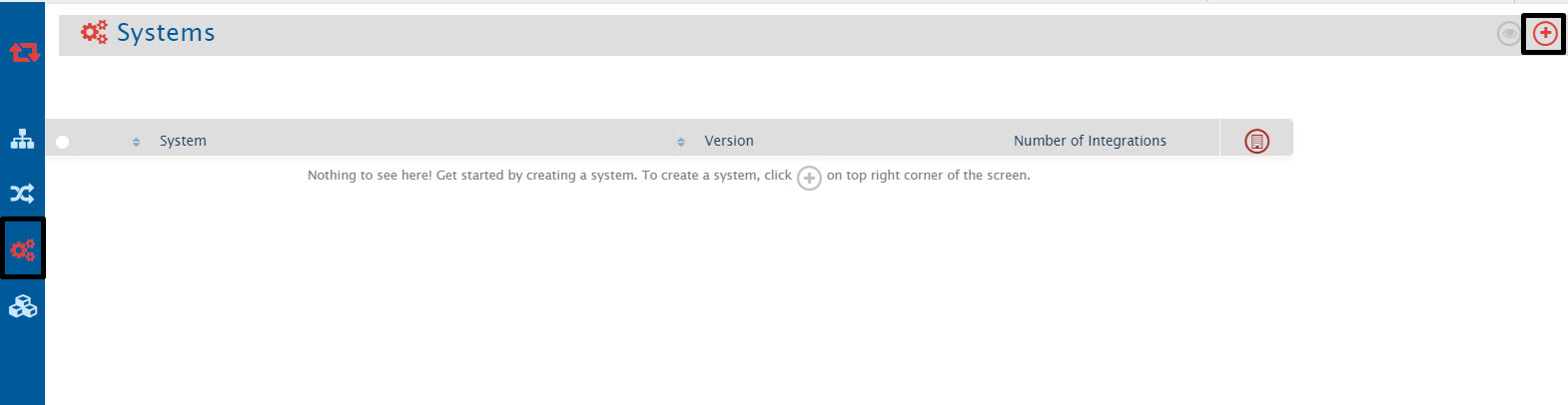
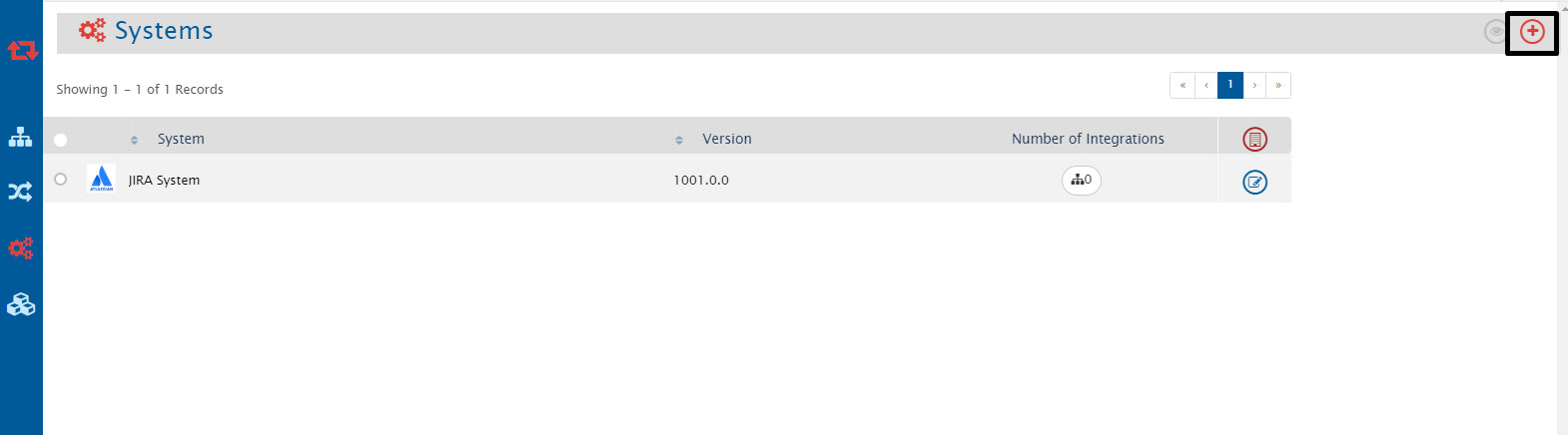
- Once you log in, navigate to Configure systems by clicking the plus sign at the top-right corner of the screen.
- Write Jira at the system type or select the Jira system to put the necessary system details.
- Write Jira at the system type or select the Jira system to put the necessary system details.
Step 1.2: Configure GitHub system
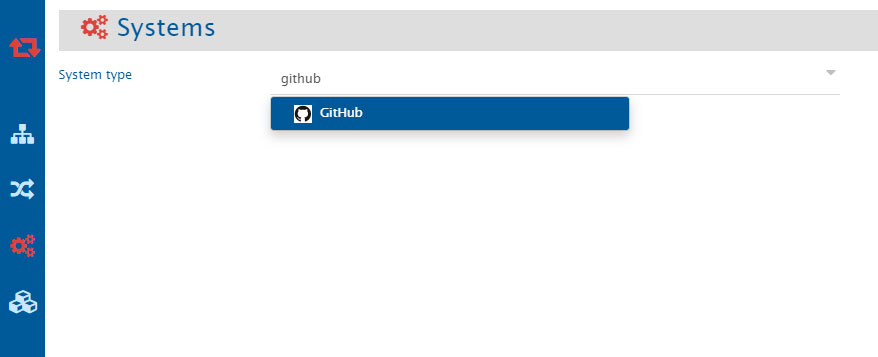
- Now, as you configure the Jira System, select the GitHub system from the system type list.
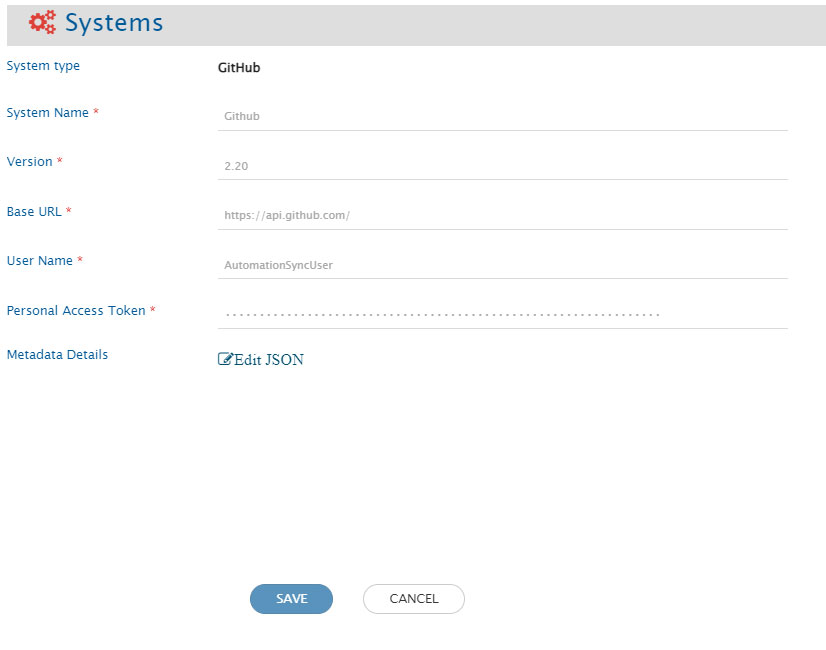
- Provide the necessary configuration details for GitHub system, then click to save it.
Step 2: Mapping the Entities
Configuring the mapping after the systems are configured
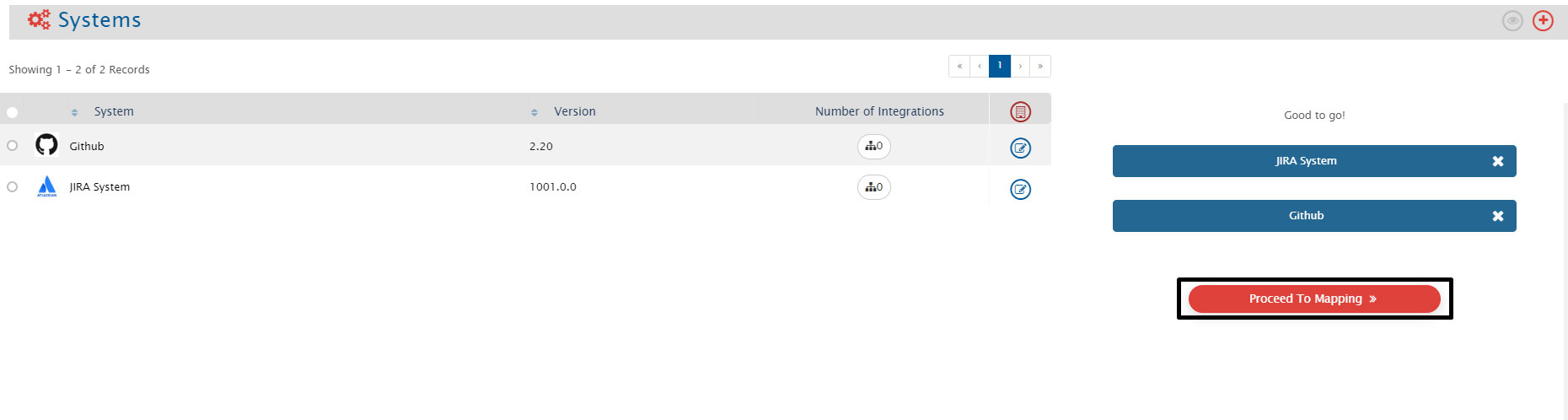
- Drag and drop the systems at the Configure System screen, to initiate the mapping. After you put the system, click ’Proceed To Mapping.
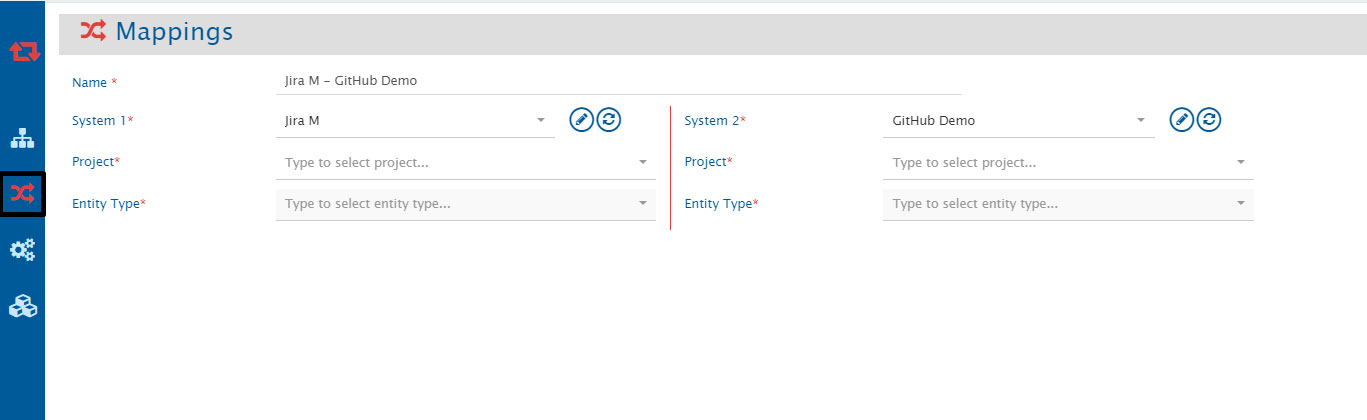
- It will redirect you to the Configure Mappings page automatically. Select your project and entity type here to proceed.
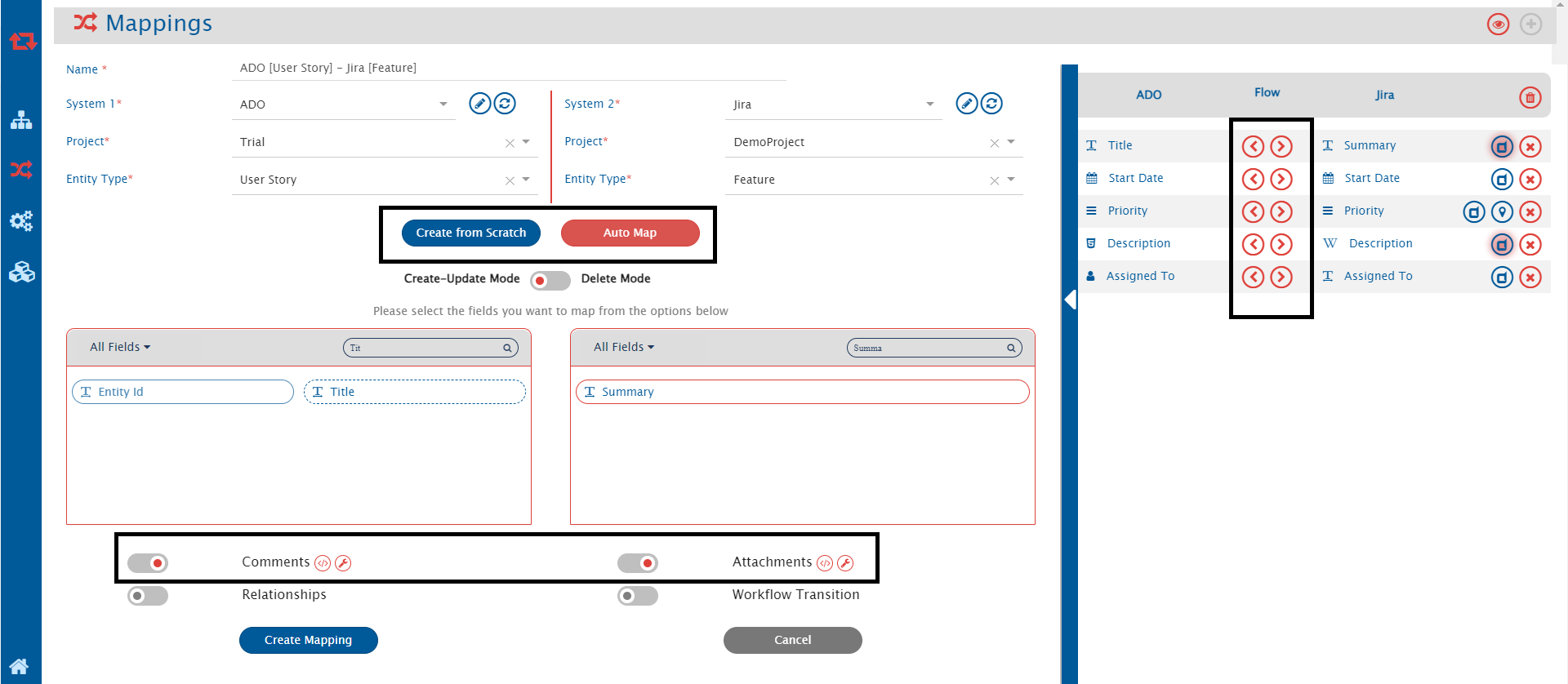
- Here you select the fields you want to map, check if you want to sync the comments and attachments, define the flow of information between the two systems, then click Create Mapping to save it.
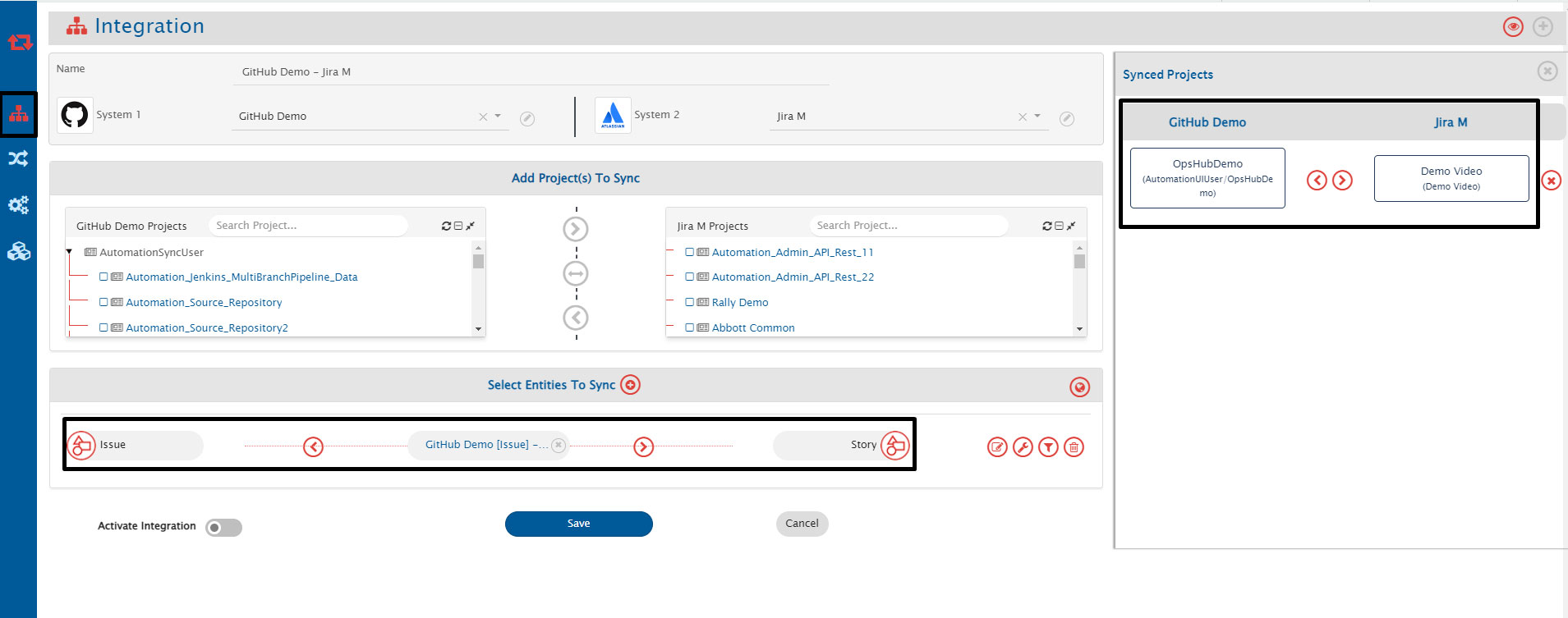
Step 3: Integration Creation
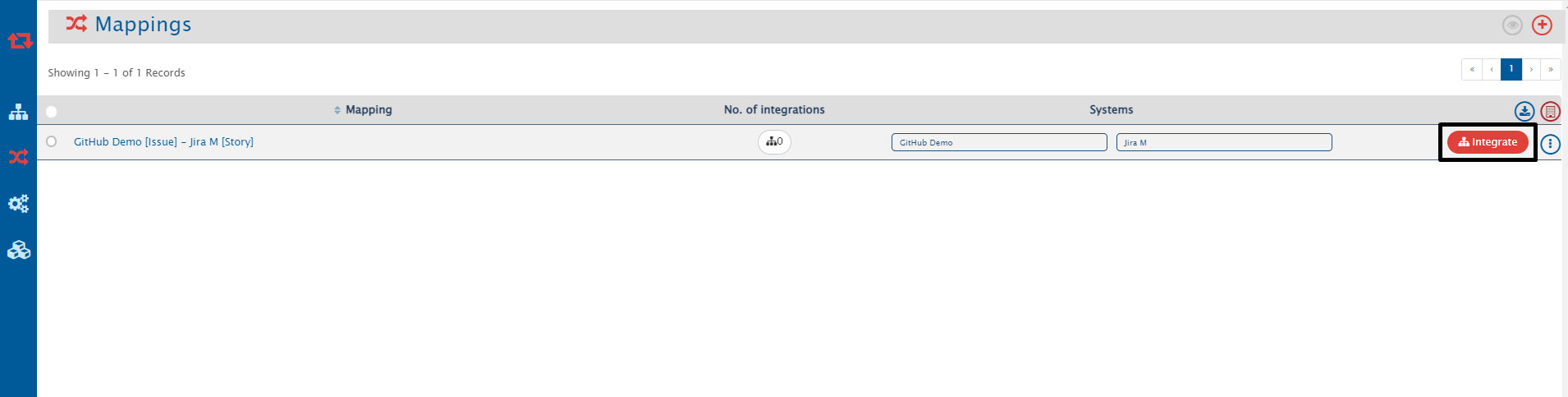
- Once your mapping created, it would look like below, click the integrate button to proceed.
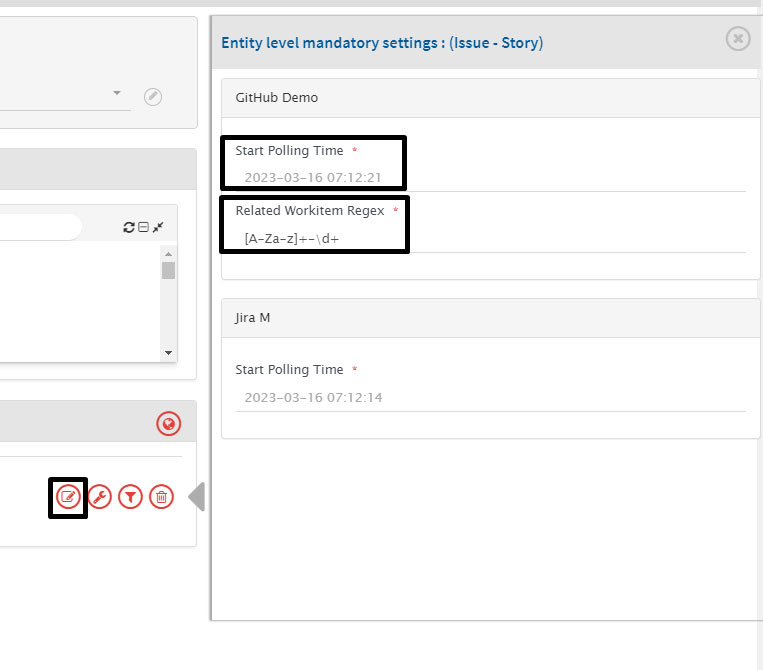
- For synchronization, you need to specify a Related Workitem Regex(Regular Expression) while configuring integration for picking related work item id from the commit message in case of Commit Information and Title/Description in case of Pull Requests.
- For example, for commit information, if your commit message is: “commiting against TEST-123, added login feature for my website” and the related work item id on which you want to synchronize commit information is TEST-123, then RegEx for your input will be: [A-Za-z]+-\d+.
- You can set up the polling time here, to define the migration/integration start.
- You can define the flow of integration/migration, add/remove projects or entities in this section. Once you fill up the details, please click the Save button to complete the integration creation.
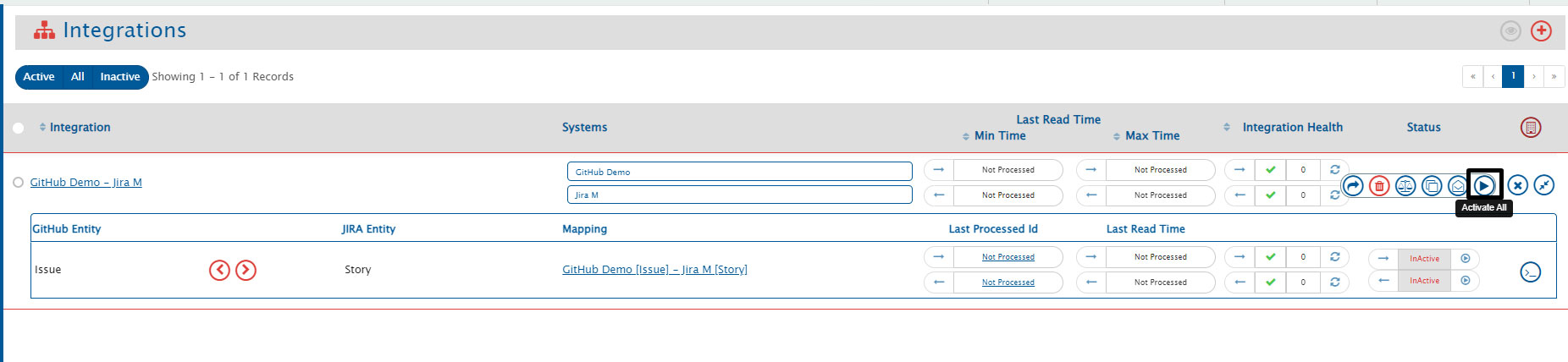
Step 4: Activating the integration
Summing up
An intelligent Digital Mesh unifies your ecosystem and provides each team member with the ability to make informed decisions, leading to better decision making and faster time to value. By adopting an innovation-first approach to your operations, you can design a consistent model for achieving goals faster and delivering better. Jira-GitHub is one of the many integration use cases that can help enterprises get one step further to realizing the true benefits of digital transformation.
By integrating Jira and GitHub, teams can automate processes, reduce manual updates, and minimize the risk of errors. Additionally, Jira GitHub integration can help teams implement CI/CD processes, which can lead to faster time-to-market and better software quality.